Avvera Technologies · Ivan Jovanovic
Premium Knack development.
Fast. Reliable. Detailed.
Examples
In-App Notifications
- Bell icon with unread count badge updates in real-time
- Multiple notification types, each with their own styling
- Click any notification to navigate directly to the ticket
- Mark individual or all notifications as read
- Role-based access controls what each user can click through to
- Users control their own notification preferences (in-app, email, or both)
PDF Auto Filler
Select a PDF template and auto-populate it with record data from your Knack app. No subscription required. Runs entirely locally in your Knack app.
- Store your PDF templates directly in your Knack app
- Automatically fills PDF fields with data from your Knack app
- Supports most PDF field types: checkboxes, radio buttons, math equations, image fields, and more
- Option to overwrite auto-filled data
- Preserves PDF layout and formatting with auto-sizing support
- Option to have a combination of actions: Preview PDF, Download Filled PDF to Device, Upload Filled PDFs to your app
Bulk Add Timesheets
- Multi-select tickets from table view
- Submit timesheets for all selected records in one operation
- Even split by default with option to manually edit hours per ticket
- Pull user's default hourly rate with option to override per row
- Progress bar during submission
- Auto-refresh table after completion
Bulk File Upload
- Drag and drop multiple files at once
- Paste images directly from clipboard using Ctrl+V (or Cmd+V)
- Per-file upload progress with visual spinners
- Success/failure indication for each file
- Works on attachment fields across different views
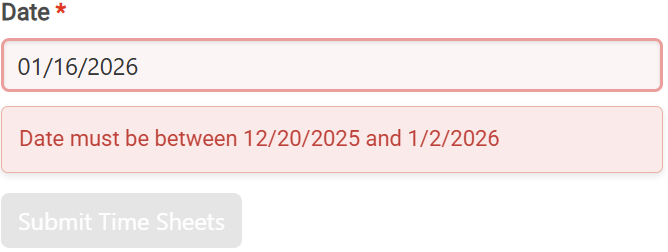
Payroll Period Validation
Prevents timesheet entry errors by enforcing date boundaries automatically.
- Date picker restricts entries to current payroll period
- Configurable grace period allows submitting time for the previous period after a new one starts
- Background polling detects payroll period changes; stale sessions auto-refresh within 60 seconds
Copy Ticket Link
Share links across user roles without permission errors. Each user auto-redirects to their accessible view.
- One-click copy to clipboard
- Auto-redirects users based on their role and permissions
- Prevents 'access denied' errors when sharing across teams
- Floating button you can add to any page
Example: Admin shares a link with a team member who has limited access. They're redirected to their role's view instead of a permission error.
Email Reply-To
Reply directly to email notifications to add records. No login required. Replies are parsed, validated, and added automatically.
- Reply to notification emails to add records instantly
- Can integrate an AI step to parse, summarize, and more, before the reply is added back into the system
- Sender verified against registered users
- Visibility inherited from original record (internal stays internal)
- Invalid replies bounced with helpful error message
Example: User receives an email notification from the app, replies with their feedback, and it appears as a new record in the app.
Free Tool
Knavigator
Free visualization tool to explore your Knack app architecture. See views, scenes, fields, objects, and how they connect.
- Fast, clean interface with comprehensive information
- Track and manage emails across your application
- Save multiple app IDs for quick switching
- Regularly updated with new features and capabilities
How I Work
Fixed price, clear scope. You know the cost before we start, and that's what you pay. MVP in a day. Complex app in a month. Enterprise system in three months.
You work with me directly. No account managers, no handoffs. I respond quickly. I take full ownership of results.
Knack-focused. 10 years building apps and workflows.